
Zendesk Explore for reporting and analytics is designed to help you analyze, understand, and share your business information. Explore provides powerful, prebuilt reports that help you view and analyze key information about your customers, support resources, and more. When you need reports tailored to your unique needs, you can use the tools in Explore to build your own reports.
Explore also lets you share and collaborate on reports with others. Reports can be shared on a one-time or recurring basis to anyone in your organization. With some plans, you can even share with individuals who aren't part of your support team.
In this article, you'll learn the basics you need to get up and running with Explore. If you're looking for a an even quicker start, see the Explore quick start guide. If you're an Insights user upgrading to Explore, you'll find some great resources to help you in Moving to Explore from Insights.
This article contains the following topics:
Activating Explore
Before you can use Explore, you must activate it. When you first open Explore, it prepares your Zendesk data for reporting. Depending on the amount of information and tickets you have, this could take a few minutes to a few hours. You can select an option to have Explore inform you when it's ready for use.
For more information, see Activating Explore and giving yourself access.
Giving access to Explore
To help ensure the security of your business information, Explore provides different user roles and permissions that give different levels of access to Explore's capabilities. Before your agents can access Explore, you must configure their roles and permissions.
The following roles can be configured:
- Editors can create custom reports and dashboards.
- Admins have the same abilities as editors and can manage viewers and permissions as well.
- Viewers can view and interact with prebuilt and shared dashboards.
For more information, see Understanding Explore user roles and Giving users access to Explore.
Understanding key Explore concepts
This section introduces you to some of the main concepts you'll need to know to get the best from Explore:
Dashboards
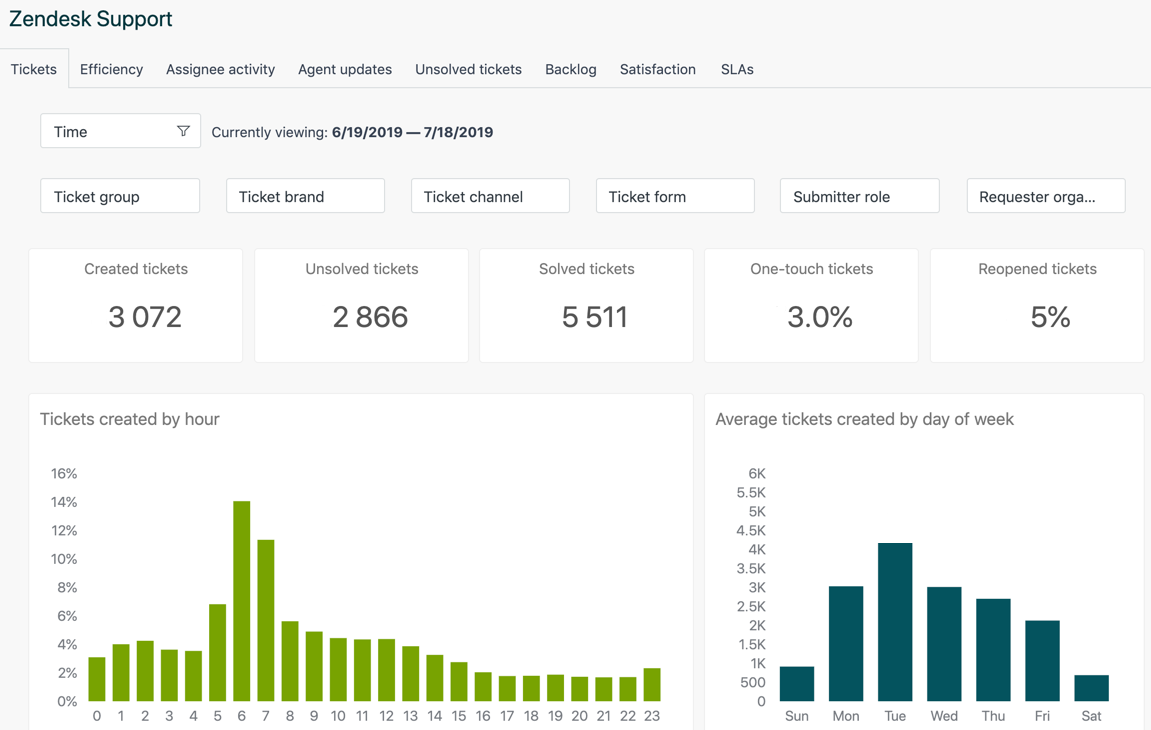
A dashboard is a space to present information about your Zendesk products. Each dashboard is made up of widgets, which can include reports, images, text, and more.
Zendesk provides you with prebuilt dashboards that contain information about your product metrics, agent activity, and more. Depending on your Explore plan, you can use the prebuilt dashboards, create editable copies of them, or create completely new dashboards.
For more information, see Understanding dashboards.
Comments
0 comments
Please sign in to leave a comment.